


Are our Facebook and Instagram ads actually working?
Where are we wasting budget?
What should we fix first?
These are three questions marketers and CEOs often ask me. The fastest way to answer them is to open the ad account and take a proper look.
After 12 years as a growth and paid ads consultant, I’ve noticed that one of the key areas where companies need help is auditing and improving their online ad accounts. (The others are growth strategy and measurement.)
Many of the Facebook ad audits I’ve done have happened during a one-hour consulting call.
We would discuss all sorts of other marketing questions and still find time for a quick account review.
With smaller accounts, the biggest issues can appear almost at a glance. But allow about one hour to work through the account properly, check the evidence and leave with a prioritised list of fixes.
So… where do you start?
How do you audit a Meta advertising account? What should you check? And how will you know what is actually worth improving?
And most importantly: how to keep your audit structured and readable by the rest of your team?

That is exactly what this guide will help you do.
We will go through ten areas, mark each one red, amber or green, and finish with a short list of actions.
The checklist covers both Facebook and Instagram ads because they are managed through the same Meta ad account and campaign system.
Meta ads = Facebook and Instagram ads.
AI-assisted audits
Can you use AI to audit and optimise your Meta ads?
Yes and no.
AI is useful for organising campaign exports, analysing spreadsheet data, spotting unusual changes, summarising creative results and suggesting hypotheses. Meta itself uses AI across targeting, bidding, placements, delivery and creative production.
But writing a full-scale audit is not the same as checking weekly KPIs.
AI only sees the data and instructions it receives. It can’t assess the overall account history, structure, and judge whether the ad creatives are optimal (value prop + ad type + graphic design).
Moreover, before AI can analyse an account properly, it needs access to the right data. That means setting up integrations, checking permissions, connecting reporting sources and deciding what business context to provide.
The setup alone can take a day. A focused manual audit of a smaller account takes about one hour.
That is why I still audit Meta ad accounts manually.
Past experience matters a lot, especially when several problems overlap and you need to decide what not to change.
This guide will help you through some complex issues and advise you on what works.
So… Let’s get to it!

Facebook ads audit checklist
Here’s a quick overview of the ten questions that I always ask, check and review when auditing a Facebook advertising account.
They’re based on 12 years of working with paid ads and seeing what works, what does not, and what only looks good in an Ads Manager report.
I’ve grouped them by what you’re looking at, although in practice many of the problems overlap.
For the best audit flow, go through all points in the suggested order.
Business and measurement level:
- Do we know what a good business result looks like?
- Is the conversion tracking set up correctly?
- Can we trust and explain the results Meta is attributing?
Campaign level:
- Are the campaigns optimised for the right goal?
- Is the campaign structure helping or hurting delivery?
- Do the budgets and bid controls give Meta enough room to learn?
Audience level:
- Are we using the right audiences, signals and exclusions?
Ad design and landing page experience:
- Does the account have enough strong and varied creative?
- Do the ads work across the placements receiving spend?
- Is the post-click experience actually converting?
Open Meta Ads Manager and work through the questions in order.
If you cannot see the company’s ad account, check that you are using the correct Business Portfolio and ask the in-house marketer or agency to grant the right access (Editor or Admin).
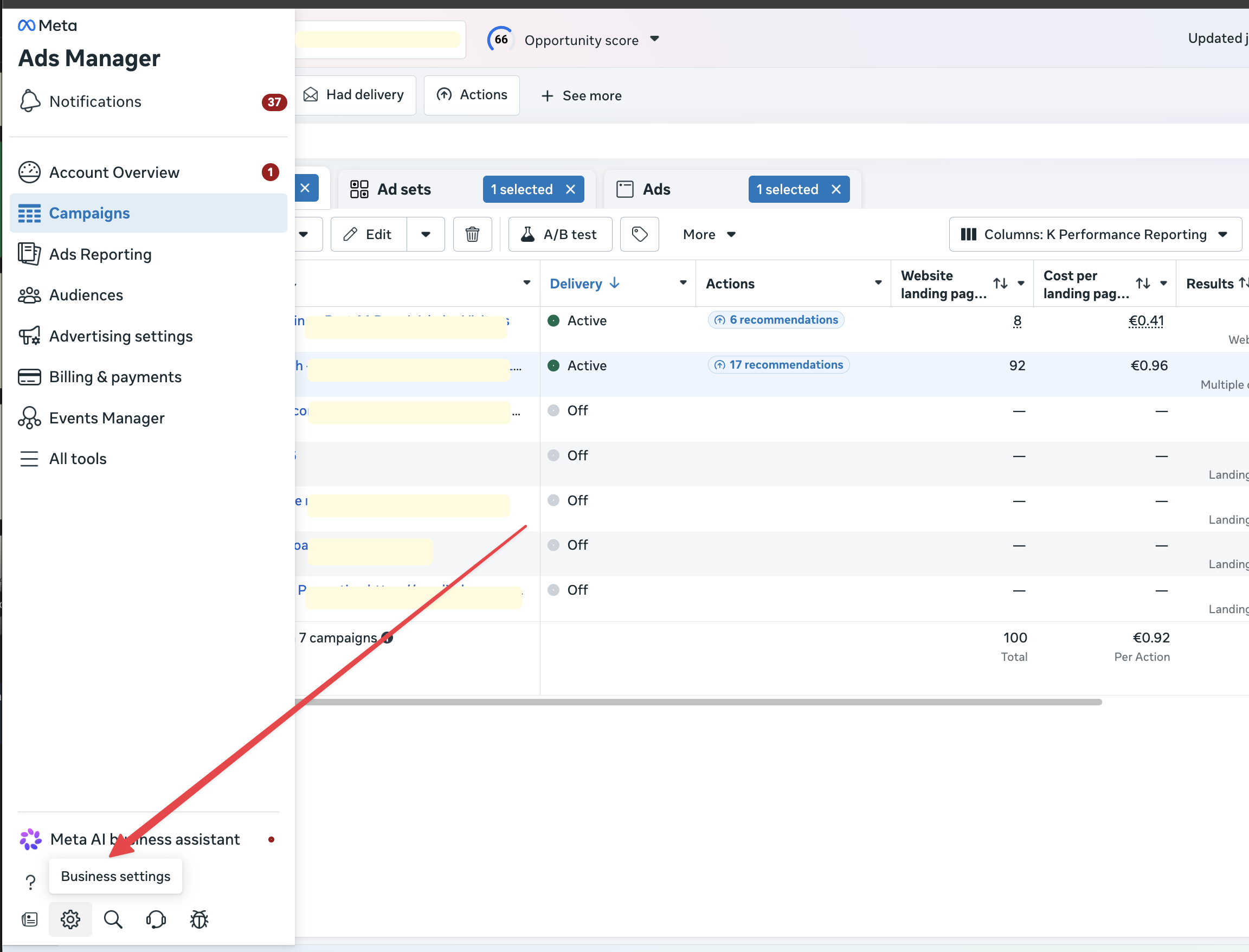
Here’s how to navigate to the Business Manager from a Facebook Ads account. It’s sort of hidden at the bottom of the left-hand menu.
1. Business goal
Is the business goal clear for your Meta ad campaigns?
Before you inspect campaign settings, define what good paid advertising results mean for the business.
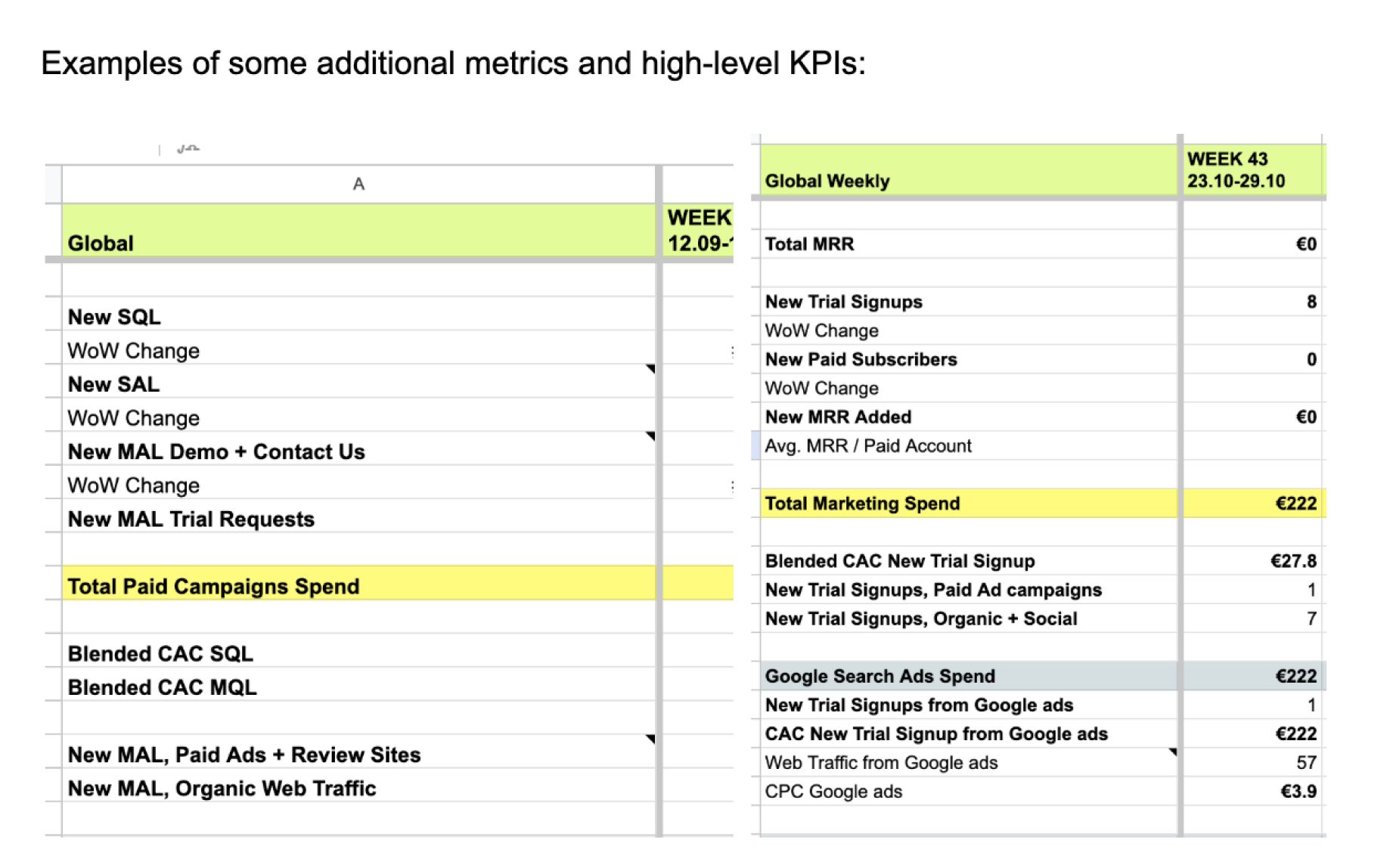
Here are some examples of the top-level growth and marketing KPIs I track for the brands I work with. Note how they’re all linked to revenue.
A campaign can look efficient inside Ads Manager while failing commercially.
For example, a lead campaign may produce a low cost per lead. But if the leads never answer the phone, fit the ideal customer profile or become customers, the campaign is not working.
Do not begin with Meta’s dashboard. Begin with the business model.
These are the most common mistakes I look for:
- The campaigns support no clear business goal.
- The optimisation goals are not tied to revenue, qualified leads, subscriptions, app activity or another valuable outcome.
- The team has not defined the maximum acceptable cost per result, or can’t even track it.
- The campaign performance is judged by easy platform metrics like clicks and impressions, not ROAS (return on ad spend).
Mark this audit step red if: The marketing team cannot agree on the primary business result or the acceptable acquisition cost.
What to do next: Define one primary success metric and the budget limit around it before running campaigns.
2. Conversion tracking
Is your Meta conversion tracking correctly set up?
If the measurement is wrong, every optimisation decision after it is also questionable.
These are the most common mistakes I look for:
- The Meta Pixel is not receiving the expected browser events.
- Conversions API is missing where it would improve the signal.
- Browser and server events are not deduplicated correctly.
- Purchase value or currency is missing or inconsistent.
- The selected conversion event fires on the wrong action.
- Events Manager shows unresolved critical diagnostics.
- Meta-reported leads or purchases are not compared with CRM or backend outcomes.
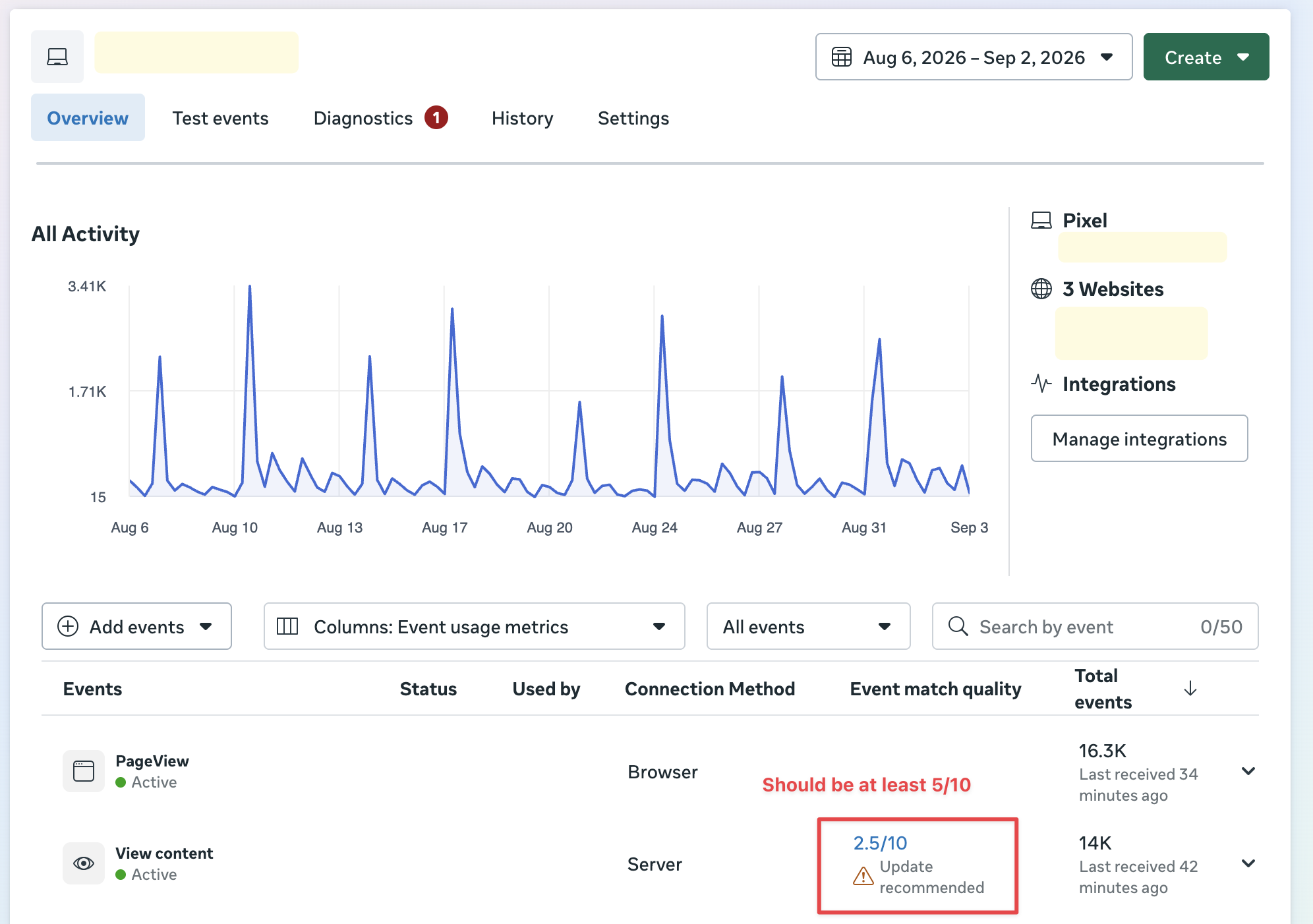
For example, in the screenshot below, the Meta Pixel is firing properly, but the event match score needs improvement.
Compare Meta with your analytics, ecommerce platform, CRM or revenue records. The totals do not need to match perfectly because attribution methods differ. But you should understand why they differ.
Mark this red if: Important events are missing, duplicated, assigned the wrong value or materially disconnected from real outcomes.
What to do next: Fix measurement before making large budget, audience or creative decisions.
3. Meta-reported results
Can you explain what Meta is attributing?
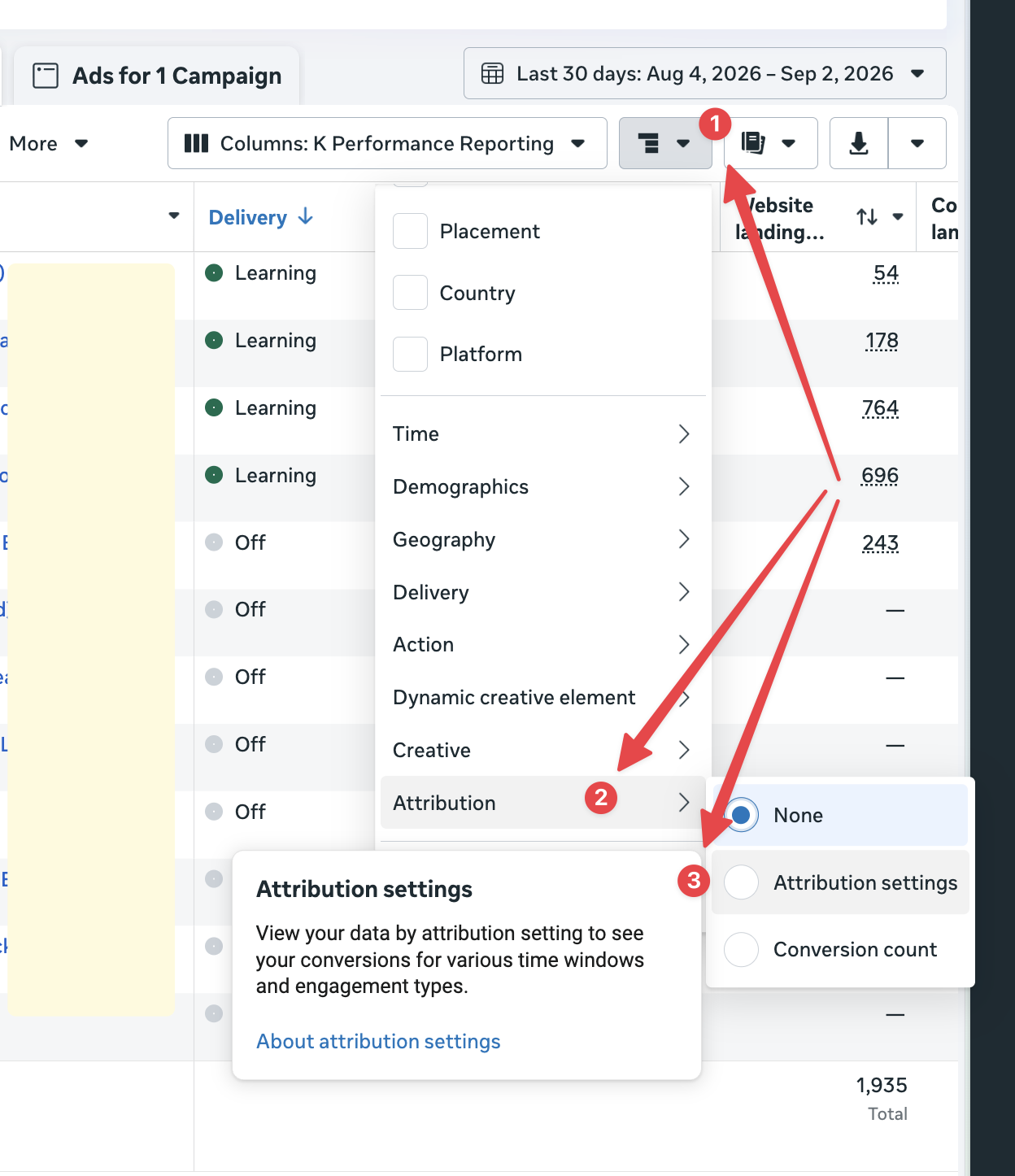
Check the attribution setting used by 2-3 ad sets (they’re usually all the same).
An attribution window is the amount of time between someone interacting with an ad and completing an action that Meta can credit to that ad. Changing the window changes which conversions appear in your Ads Manager reports and can also affect how Meta optimises delivery.
Meta can credit conversions through several types of interaction:
- Click-through attribution: A person clicks the ad and converts within the selected window.
- View-through attribution: A person sees the ad, does not click it, but converts within the selected window.
- Engage-through attribution: In eligible campaigns, a person interacts with an ad or watches enough of a video, then converts within the supported window.
I use 1-day view and 7-day click for all my managed Meta ad campaigns.
These are the most common mistakes I look for:
- The attribution setting is not reviewed at ad-set level.
- Click-through and view-through results are not checked separately.
If Meta says a campaign generated 100 purchases and your store recorded 100 purchases in total, that does not mean Meta caused all of them.
Use platform reporting to understand delivery and optimise campaigns. Use broader business data to judge commercial impact.
If the problems go beyond the ad account, work through my 95 marketing audit questions.
Mark this amber if: The team knows that totals differ but has not documented the reasons.
Mark this red if: Decisions depend entirely on one attributed number that nobody has compared with real business results.
What to do next: Agree on a reporting view, document attribution assumptions and compare Meta with independent outcome data.
Moomin break
Congrats, you’re through the most technical part.

4. Campaign setup
Is your current campaign structure optimal?
Meta’s current campaign setup separates several decisions:
- Objective: The broad outcome of the campaign, such as sales or leads.
- Conversion location: Where the desired action happens, such as a website, app or messaging destination.
- Performance goal: The result Meta’s delivery system tries to get as efficiently as possible.
These choices should support the business goal you defined in step one.
ALWAYS optimise your prospecting-level Facebook ad campaigns on conversions.
If your campaign goal is conversions, don’t optimise on clicks. You’ll get bot clicks instead of real people.
Brand campaigns can be optimised on reach or clicks. I optimise remarketing on clicks or leads.
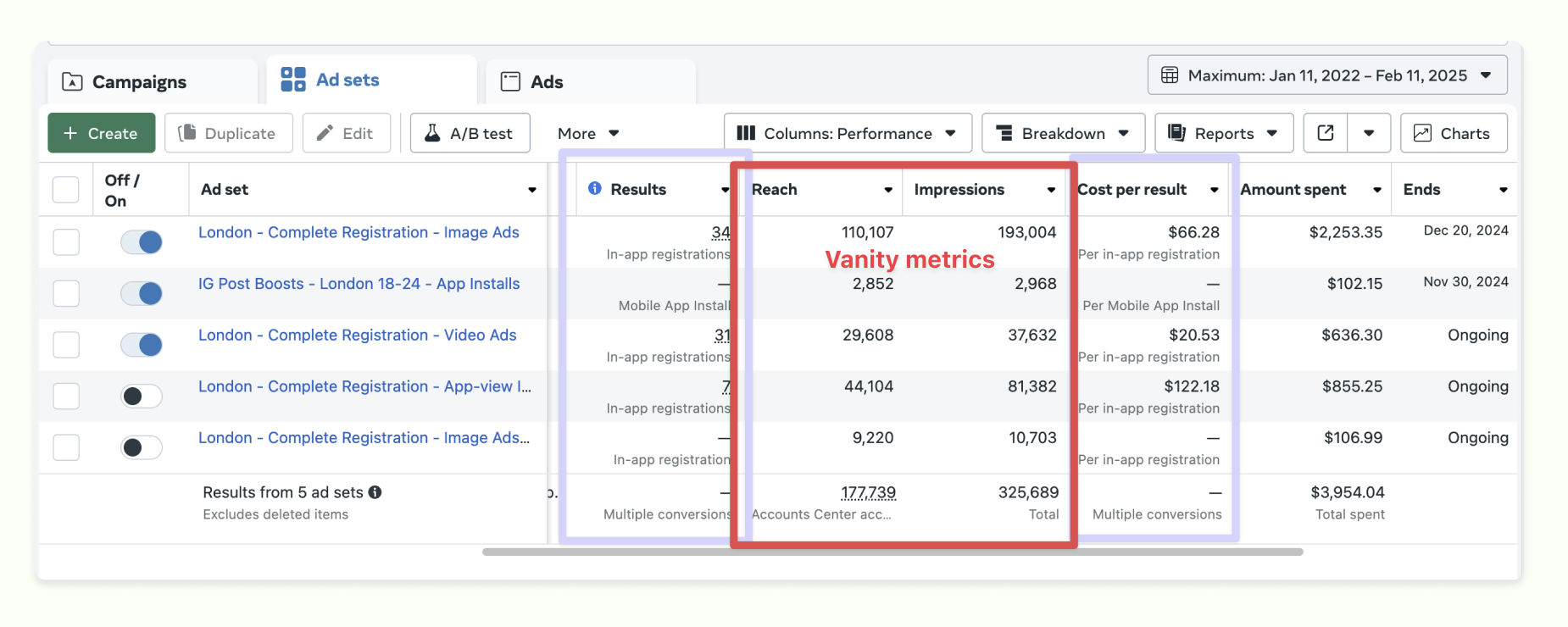
These are the most common mistakes I look for:
- The campaigns are not optimised for actions linked to revenue.
- Conversion campaigns are optimised for clicks instead of conversions.
- The optimisation event does not happen often enough for Meta to learn from it.
The idea is to have at least 50 conversions per week across the ad account. They do not all need to come from a single campaign. The point is to give Meta enough overall conversion data to optimise and give you enough results to spot meaningful patterns.
Expert tips:
- Even if your goal is to collect signups, i.e. leads, you should use the Sales campaign objective and optimise on Sign Up event conversions.
- I’ve tested optimising Meta campaigns on Purchase events when there were only 10 per week in total. It still brought better results than optimising on landing page views.
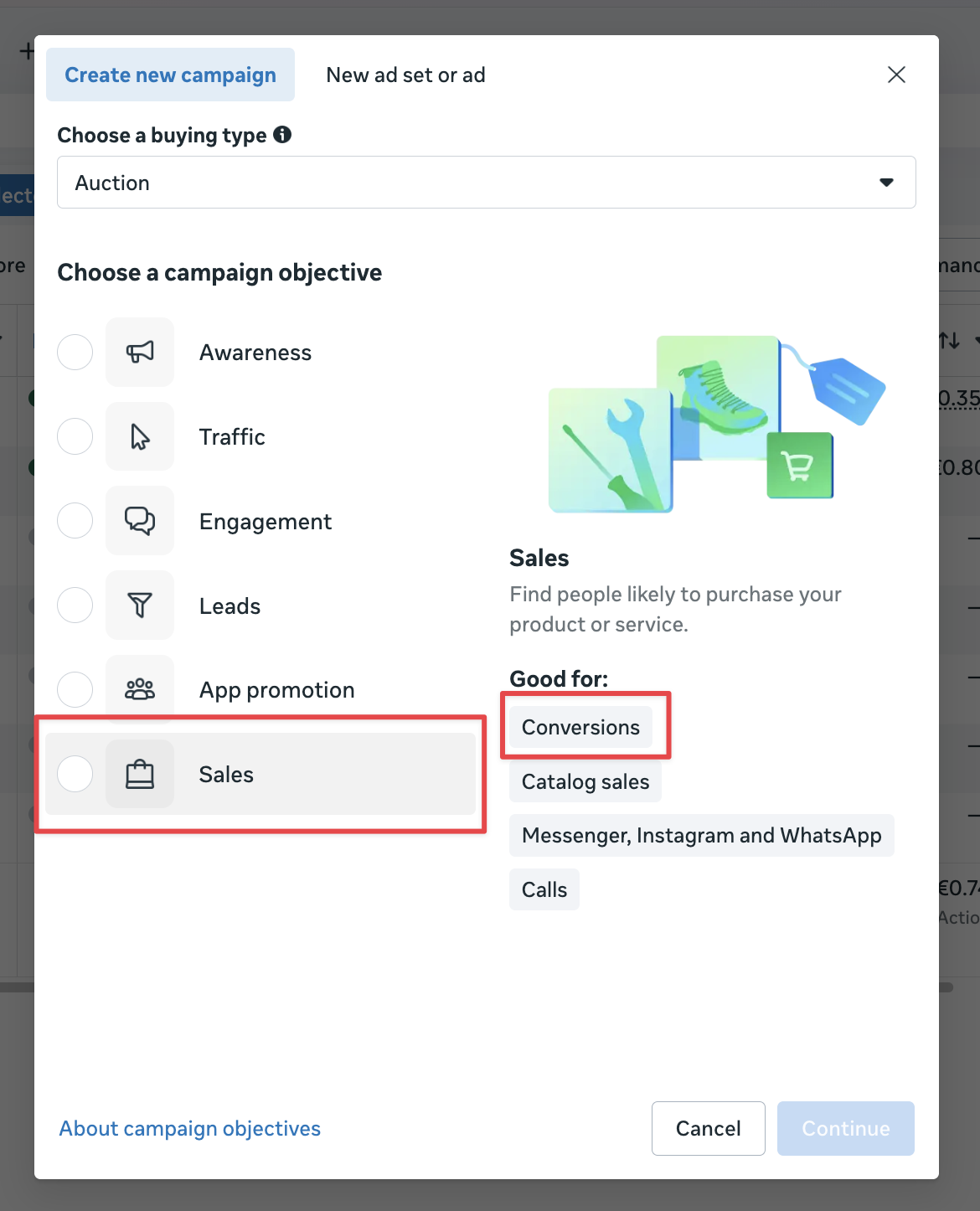
Mark this red if: Your campaigns are optimised for low-value actions.
What to do next: Optimise your campaigns on a conversion that fires at least 50 times a week.
5. Campaign structure
Is your Facebook ad campaign structure helping or fragmenting delivery?
The right structure depends on budget, markets, products, objectives, legal constraints, reporting needs and the amount of conversion data available.
These are the most common mistakes I look for:
- Too many small campaigns or ad sets competing for a small budget.
- Separate campaigns that have no meaningful difference in objective, market, offer or measurement.
- Frequent launching of new campaigns and ad sets that resets learning and makes comparisons difficult.
- Several small audience segments that could be combined.

Here are some suggestions from my own experience:
Three must-have campaign types. Launch Prospecting, Remarketing, and Re-engagement campaigns.
Separate all campaigns by countries. Different countries may have different economics, purchasing power or language requirements. Different products may require distinct offers and landing pages. Regulated markets may require tighter controls.
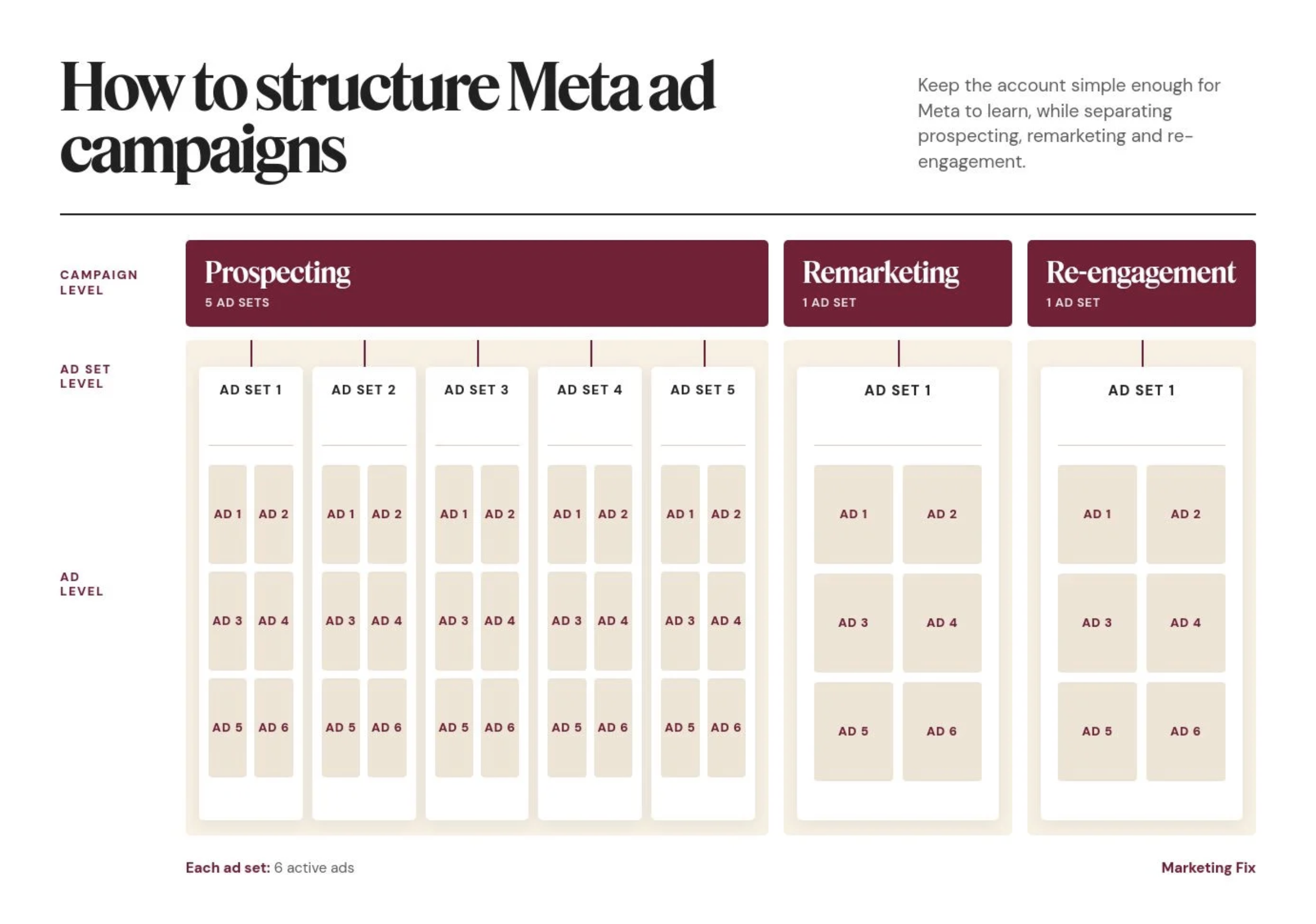
Recycle the existing campaigns. Also, many companies make the mistake of launching a new ad campaign every time they change their ad creatives or launch a new marketing campaign.
If your campaigns’ objective, audience logic, market and conversion event remain the same, it is better to keep the existing campaign and ad set, then change the ads inside them.
This preserves accumulated learning and makes performance easier to compare.
For example, here’s a sneak peek into one of the ad sets I’ve set up for Roleo. I launch new ad experiments every week, but instead of creating a new ad set every time, I pause the old ads and upload new creatives into the same ad set. It already knows my target audience.
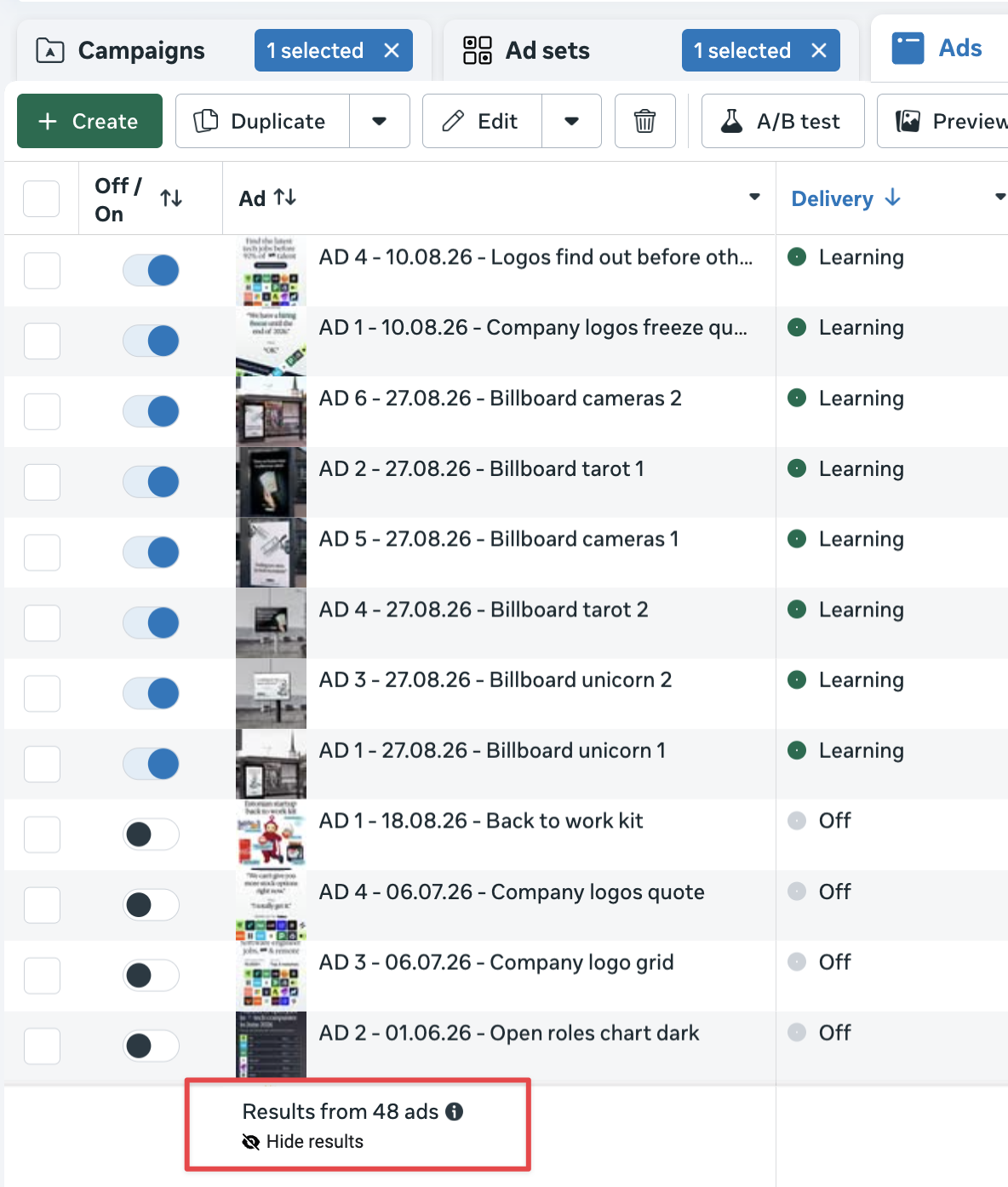
The verdict: Launch new campaigns only when there is a real structural reason, not simply because there is a new visual or campaign name in the marketing calendar.
Mark this amber if: Several campaigns or ad sets target similar audiences, use the same objective or split a limited budget, but the account still collects enough results to evaluate performance.
Mark this red if: Spend and conversions are spread across so many campaigns or ad sets that none receives enough data to optimise, or overlapping setups make it impossible to identify what is driving results.
What to do next: Keep campaigns separate only when there is a meaningful difference in objective, country, economics, product, offer or conversion event. Put new creatives inside existing campaigns whenever the core setup remains the same, and consolidate duplicate or underfunded structures.
6. Budget and delivery
Is your Meta ad budget split correctly between campaign types?
Most of your Meta ads spend should go to the main conversion (prospecting) campaigns.
Remarketing and re-engagement should run in separate campaigns and receive 5–10% of the total Meta ad spend. These audiences are smaller, so they do not need the same budgets as prospecting campaigns.
How I imagine Meta ad algorithms react to a budget increase…

These are the most common mistakes I look for:
- Too little of the budget goes to the main conversion campaigns.
- Remarketing and re-engagement do not have their own campaigns.
- Remarketing and re-engagement receive far more than 5–10% of total spend without a clear reason.
- The remaining budget is spread across too many campaigns or ad sets.
- Bid caps or cost-per-result goals prevent delivery.
- Important creative tests do not receive enough spend to produce a useful result.
If demand changes significantly through the year, use a seasonal marketing budget plan rather than treating every month as identical.
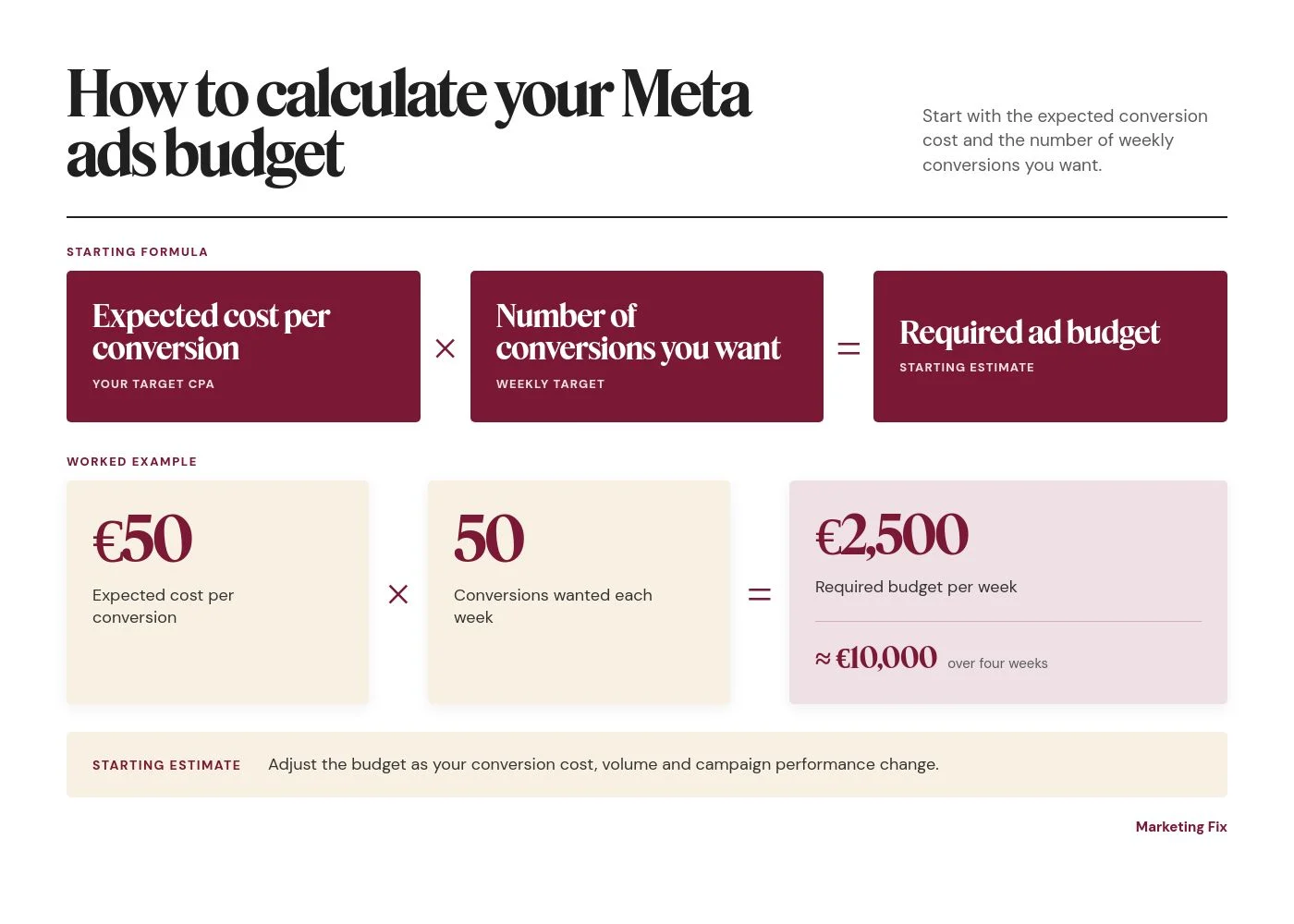
What is a good Meta ads budget? My starting formula is simple:
Expected cost per conversion × the number of conversions you want = required ad budget.
For example, if you expect one conversion to cost €50 and want 50 conversions per week:
€50 × 50 conversions = €2,500 per week, or approximately €10,000 over four weeks.
This is a starting estimate. The actual budget may need to change as the conversion cost, volume and campaign performance change.
Mark this amber if: The overall split is sensible, but one important campaign or creative test does not receive enough budget to produce a useful result.
Mark this red if: Warm audiences consume too much of the budget, or spend is fragmented so widely that the main conversion campaigns cannot collect enough data.
What to do next: Rebalance spend towards the main conversion campaigns and consolidate low-priority campaigns that dilute delivery.
7. Audiences and exclusions
Are your prospecting campaigns targeting broad enough audiences?
In most Meta ad accounts I manage, broad targeting works better. I do not try to manually build the perfect prospecting audience from interests and small segments.
For prospecting campaigns, I target people in the right locations and within the typical customer age group.
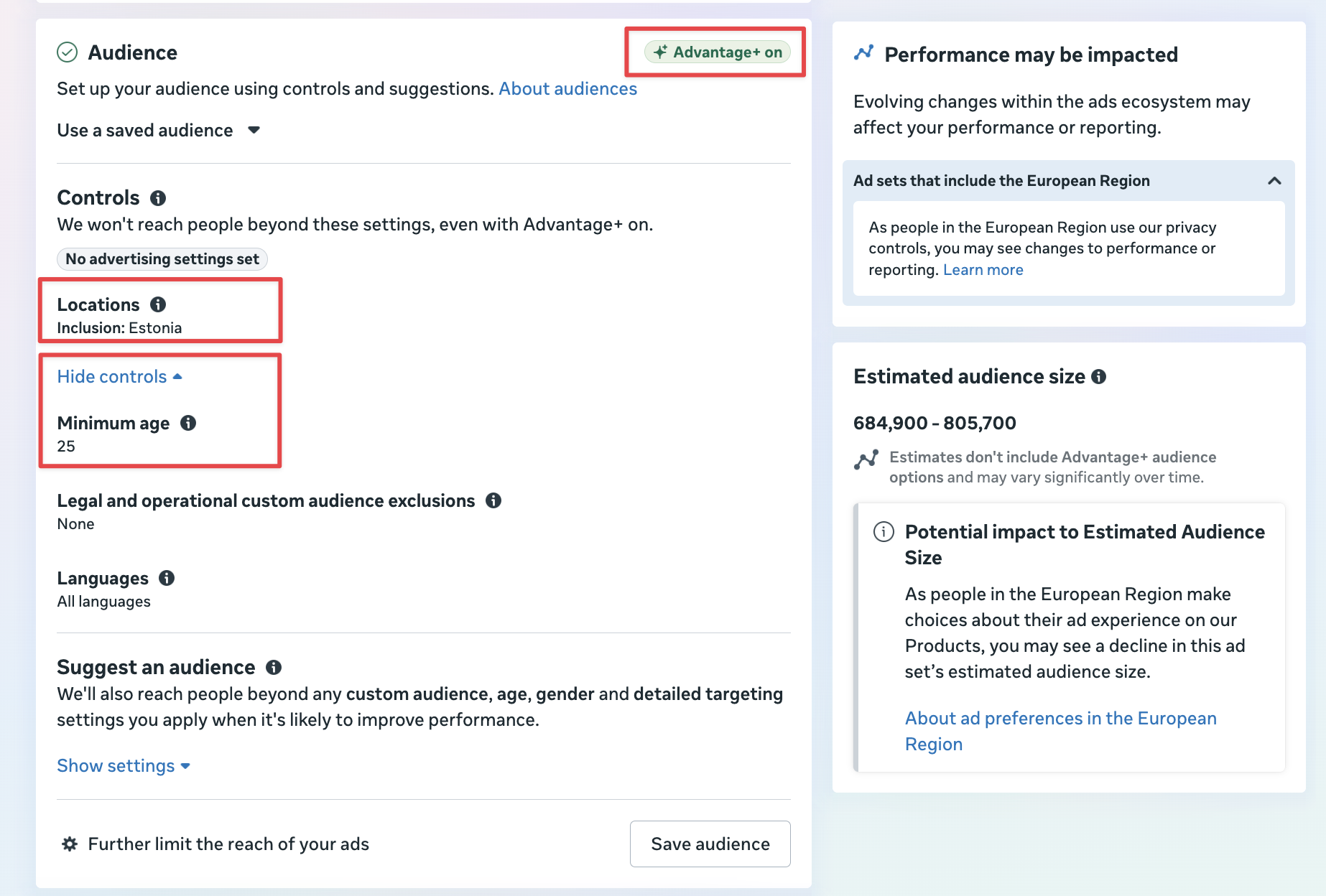
Then I let Meta optimise the audience based on who converts. As the campaign collects conversion data, Meta learns what those customers have in common and finds more people with similar characteristics.
This is why correct conversion tracking and enough weekly conversions matter so much. If Meta receives the wrong signal, it will optimise towards the wrong people.
These are the most common mistakes I look for:
- Targeting very narrow audiences of fewer than 50,000 people. A good prospecting audience size is 500k+ people.
- Adding too many interests and restrictions instead of letting Meta optimise.
- Targeting several countries with very different purchasing power or languages in the same ad set.
- Targeting the same audience in several campaigns and creating unnecessary overlap.
- Continuing to target people who already converted.
Exclude recent purchasers, qualified leads and active subscribers from acquisition campaigns when showing them the same offer no longer makes sense.
Check whether remarketing reaches all the relevant groups: recent website visitors, basket abandoners and other high-intent users. Re-engagement should focus on past customers who have not purchased or used the product for a while.
Mark this red if: Prospecting audiences are unnecessarily narrow, the campaigns target the wrong locations or age groups, converted users are not excluded, or Meta is optimising from incorrect conversion data.
What to do next: Keep prospecting broad, use only the necessary age and location controls, exclude converted users, and let Meta optimise based on the people who convert.
8. Ad creatives & testing
Are your Facebook campaigns using the best-performing ad creative types?
Sub-optimal ad creatives is the most expensive Facebook ad mistake.
In the accounts I have audited, weak creative has been a bigger problem than the targeting settings.
Common issues include generic stock imagery, outdated-looking design, weak product visibility, no clear message hierarchy and ads that could belong to almost any brand.
As people see the same ads repeatedly, ad fatigue sets in, response rates fall, and CPC and CAC can rise quickly. Testing fresh creative gives Meta new options before performance deteriorates.
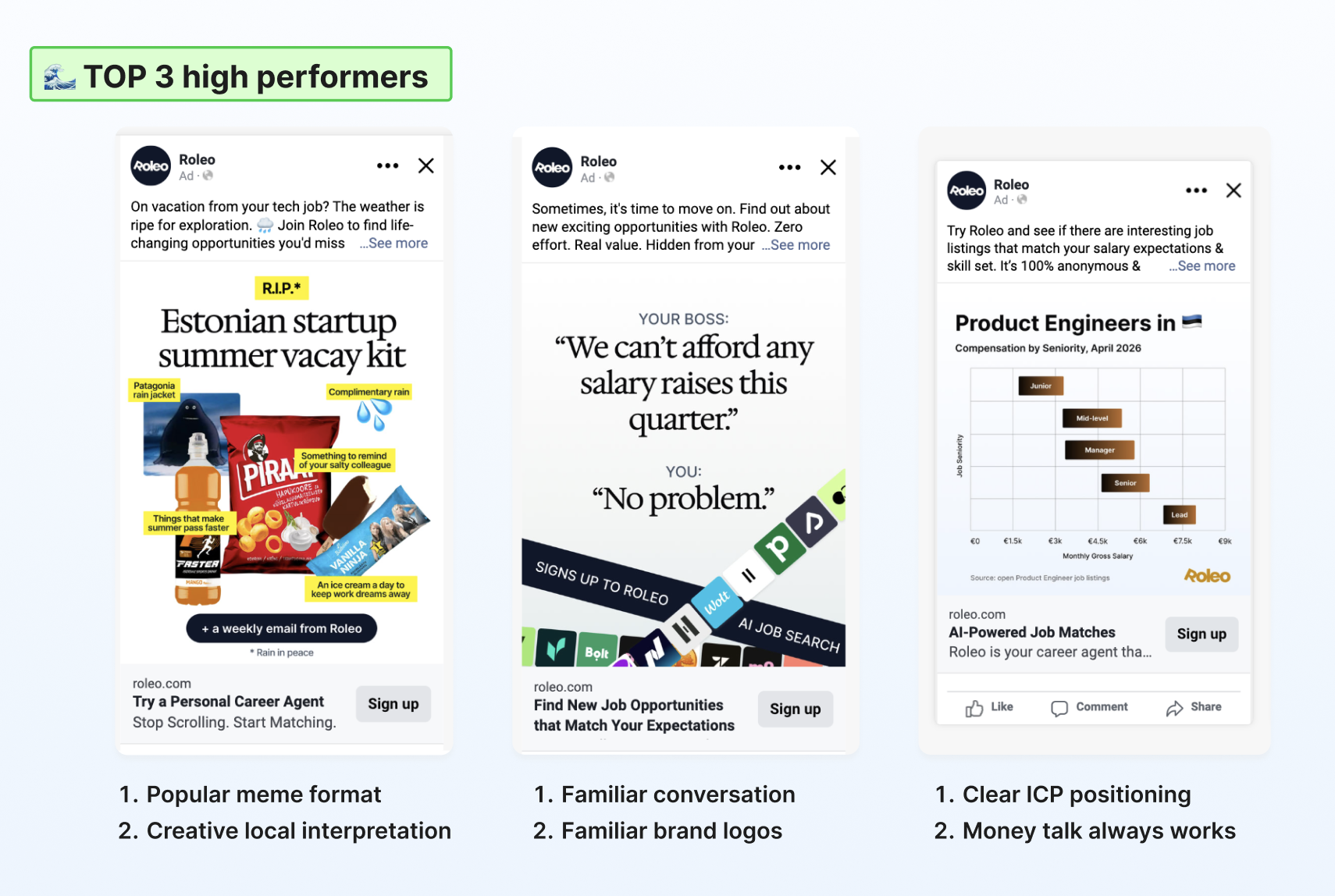
“Do the ads look attractive?” is subjective, which is why I base my decision on what I’ve seen working.
Video should be part of the review too. It is not always the best-performing format, but most advertisers should test it.
Check whether the product and benefit appear quickly, whether the opening works without sound, whether captions are readable and whether a long TV-style video has simply been dropped into Feed or Reels without adapting it. Simple motion, product footage and animated text can work perfectly well.
If you need a reference point, use the Meta Ad Library to review active competitor ads. Compare the clarity, variety, product demonstration and strength of the offer with your own account.
These are the most common mistakes I look for:
- Too few genuinely different creative concepts are tested.
- Too many or too few active creatives per ad set. A good number is 6–8.
- New ad creatives are not tested every week.
- New ads repeat the same hooks, customer problems, outcomes and proof points.
- The account relies on one format instead of testing static, video, carousel, creator or testimonial ads where relevant.
What about AI-generated ad creatives?
Can AI replace experienced graphic designers?
Meta now offers AI-assisted text, image, background, audio and video generation. There are also external tools that can produce ad variations quickly.
My view on this: Meta’s AI-generated creatives are absolutely awful and there’s no way to cut corners here. You need a human designer.
Compare this original ad with Meta AI production.
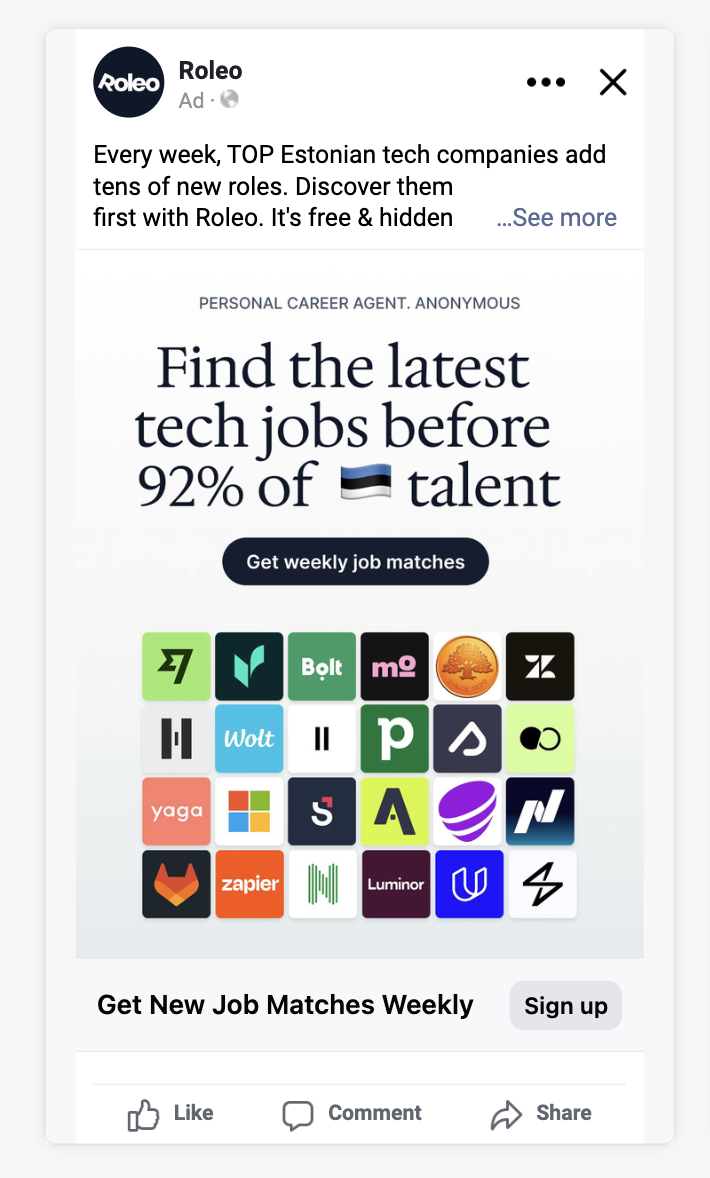
The AI-generated four ads below are noisy and scream stock footage and AI. I’d be insulted by a brand targeting me with any of these.
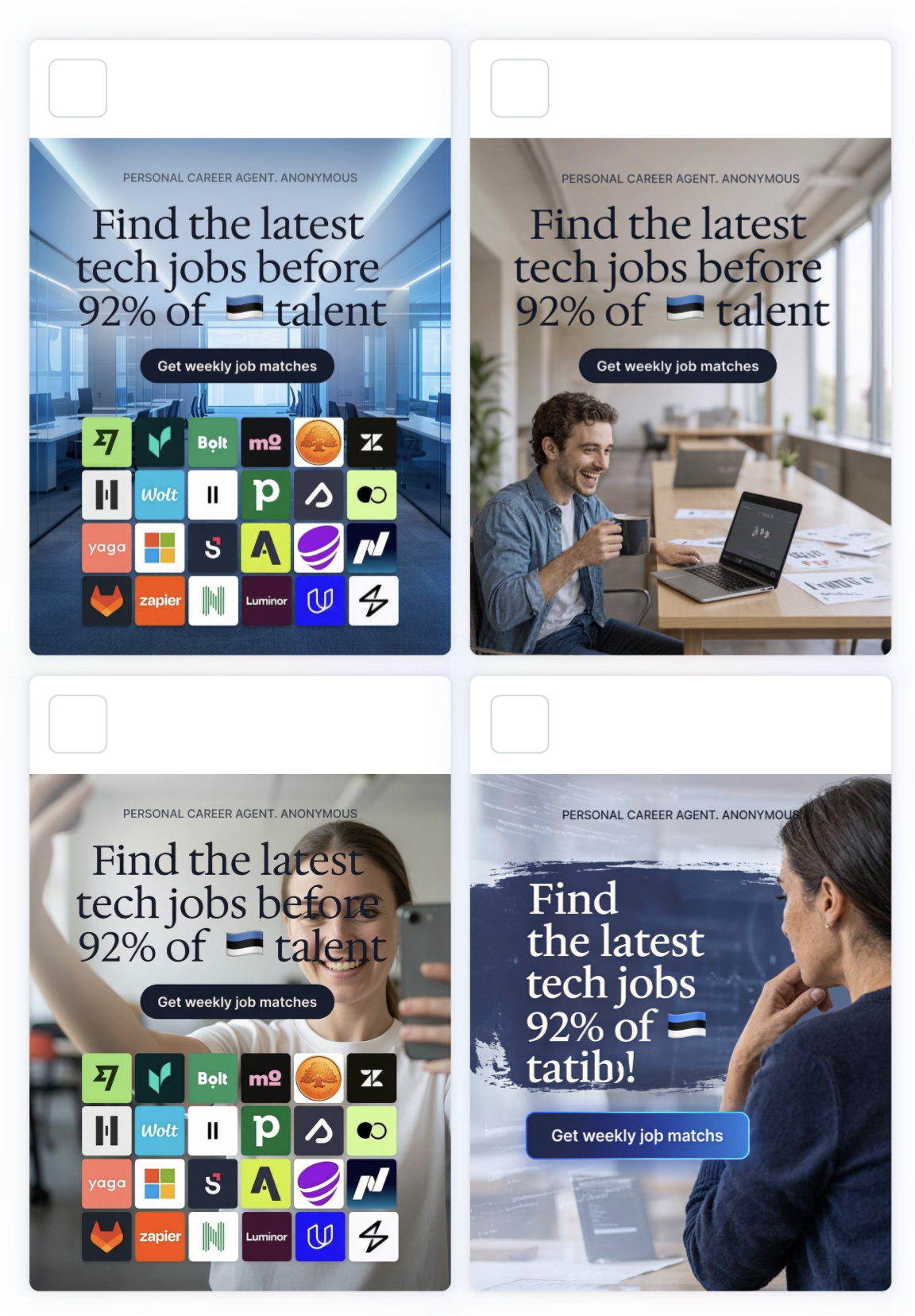
Treat AI output as drafting material (or slop to ignore), not as a finished ad.
AI can make more ads. Producing more mediocre work, faster, is not much of a win.
Weekly creative testing
Are you testing meaningful variety?
If you run Meta ads consistently, aim to test new creatives every week.
Creative development should be a weekly operating habit, not an occasional rescue project.
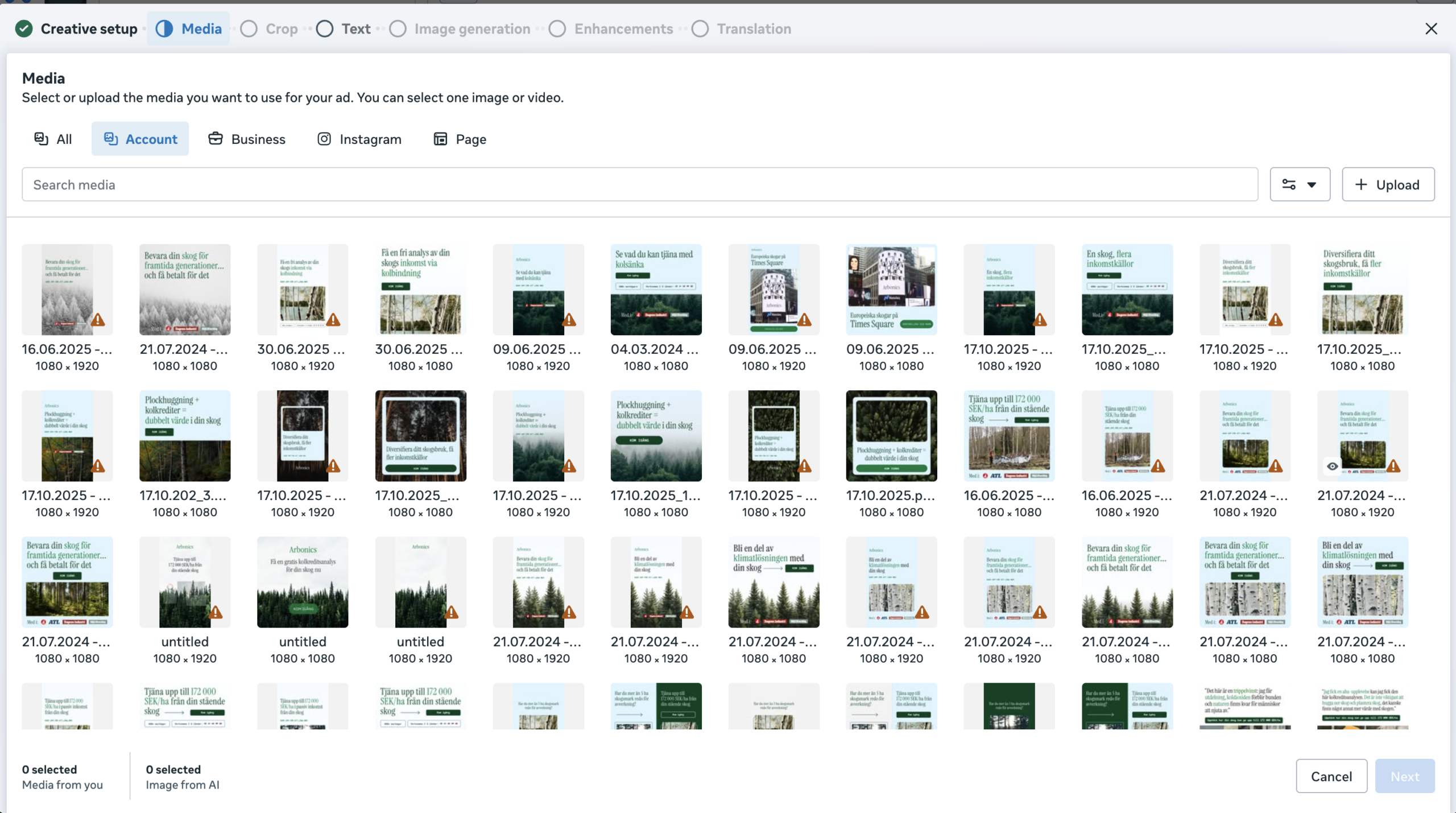
After I had been managing Arbonics’ Meta ad account for six weeks, the Facebook Media Library contained a wide range of layouts, messages and visual styles.
I had introduced that variety deliberately so we could learn what different audiences responded to.
Creative variety does not mean uploading fifty AI variations of the same ad.
Test meaningful differences:
- A different customer problem or USP.
- A new opening hook, offer or objection.
- A product showcase.
- A customer quote, creator review or other proof point.
- A different visual style or level of product detail.
There are three practical ways to produce new creative every week:
- Learn to design and edit some ads yourself.
- Hire a freelance designer or specialist agency.
- Buy high-quality templates and adapt them to your brand.
Make sure the person creating the ads understands what converts on Meta ads, not just what looks pretty.
In my experience, relying only on an internal design team rarely works. They have higher-priority projects most of the time.
A dedicated marketing designer can help, but many traditional graphic designers are not experienced in producing engaging, fast-paced social video.
Smaller accounts may need to batch experiments less frequently so each variation receives enough delivery. The principle is still the same: keep learning and document what happened.
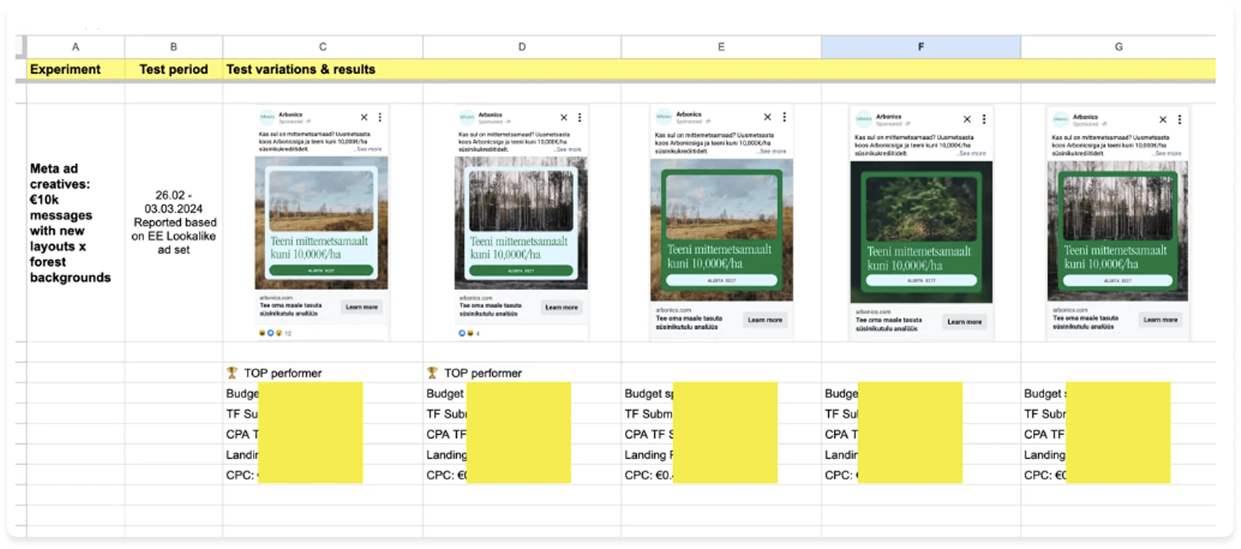
I use a spreadsheet to record the hypothesis, concept, launch date, spend, primary metric, result and takeaway for every meaningful experiment.
Use multiple ad formats
Are you giving Meta enough formats to work with?
Your creative mix can include static Feed and Story ads, short and long-form video, Reels, carousels, collections and shopping ads where relevant.
Different people respond to different formats, and not every format can serve in every placement.
A static ad, for example, will not give you the same Reels coverage as a portrait video.
Static ads are cheaper to produce and run, but video expands the placements and ways you can demonstrate the product.
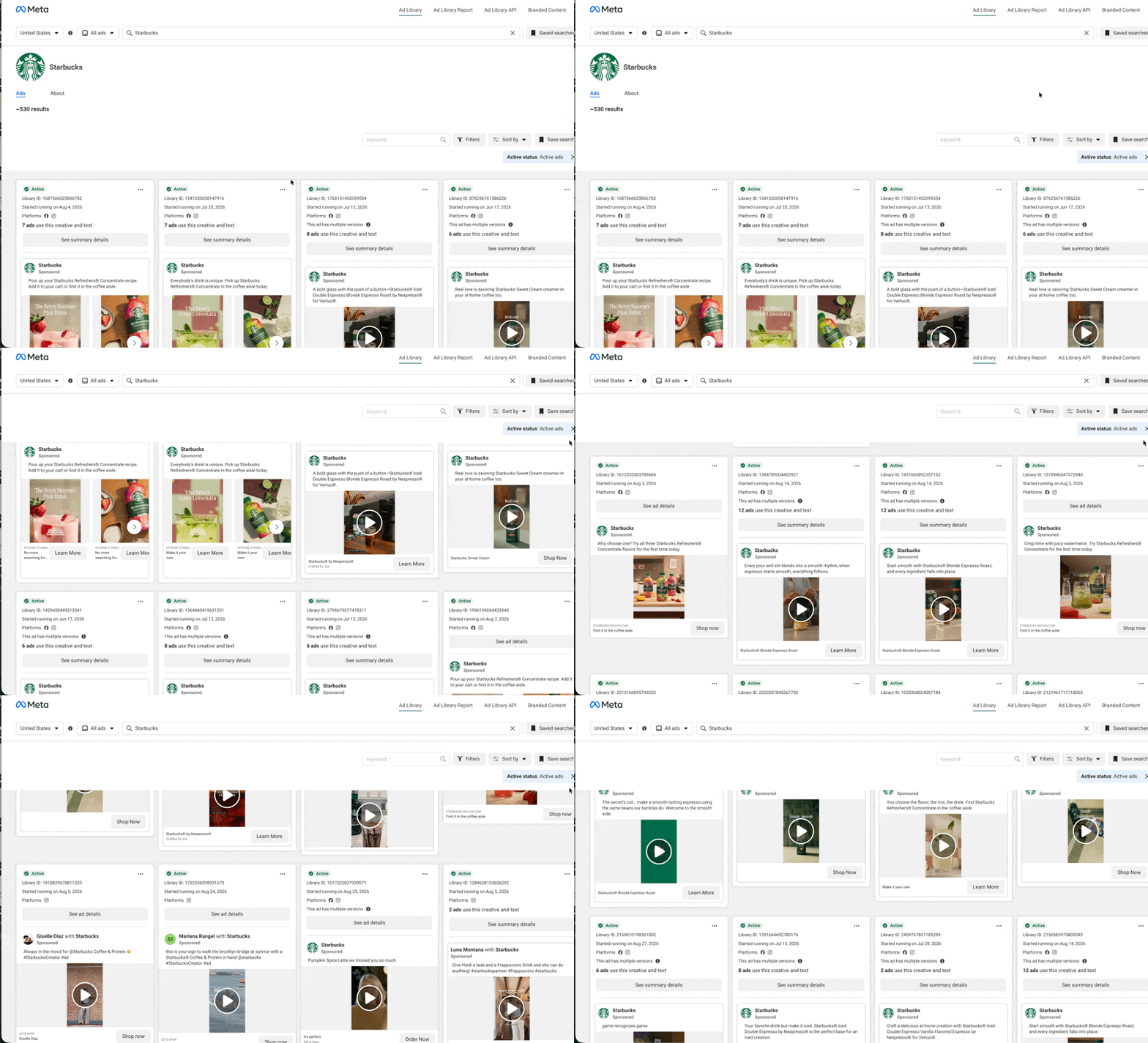
Starbucks has 540 active Facebook ads running in the US. Note how the formats, layouts, and styles differ.
Pro tip: One tactic I use is placing static and video ads in separate ad sets when I want clearer control over delivery.
This can prevent Meta from spending almost everything on the cheaper static ads while barely testing video. It also makes the format-level results easier to compare. Do not split them automatically if the account lacks enough budget or conversions to support the extra structure.
Message and visual alignment
Does the visual communicate the value proposition?
The copy and visual should work together.
Your most important message or USP should appear in the visual.
Do not leave it only in the primary text. The whole ad should make the value proposition obvious within seconds.
Meta removed its old 20% text rule years ago. Text-heavy creative can work when the message is useful, readable and designed for mobile. The issue is not the amount of text by itself. It is whether the ad communicates one strong idea clearly.
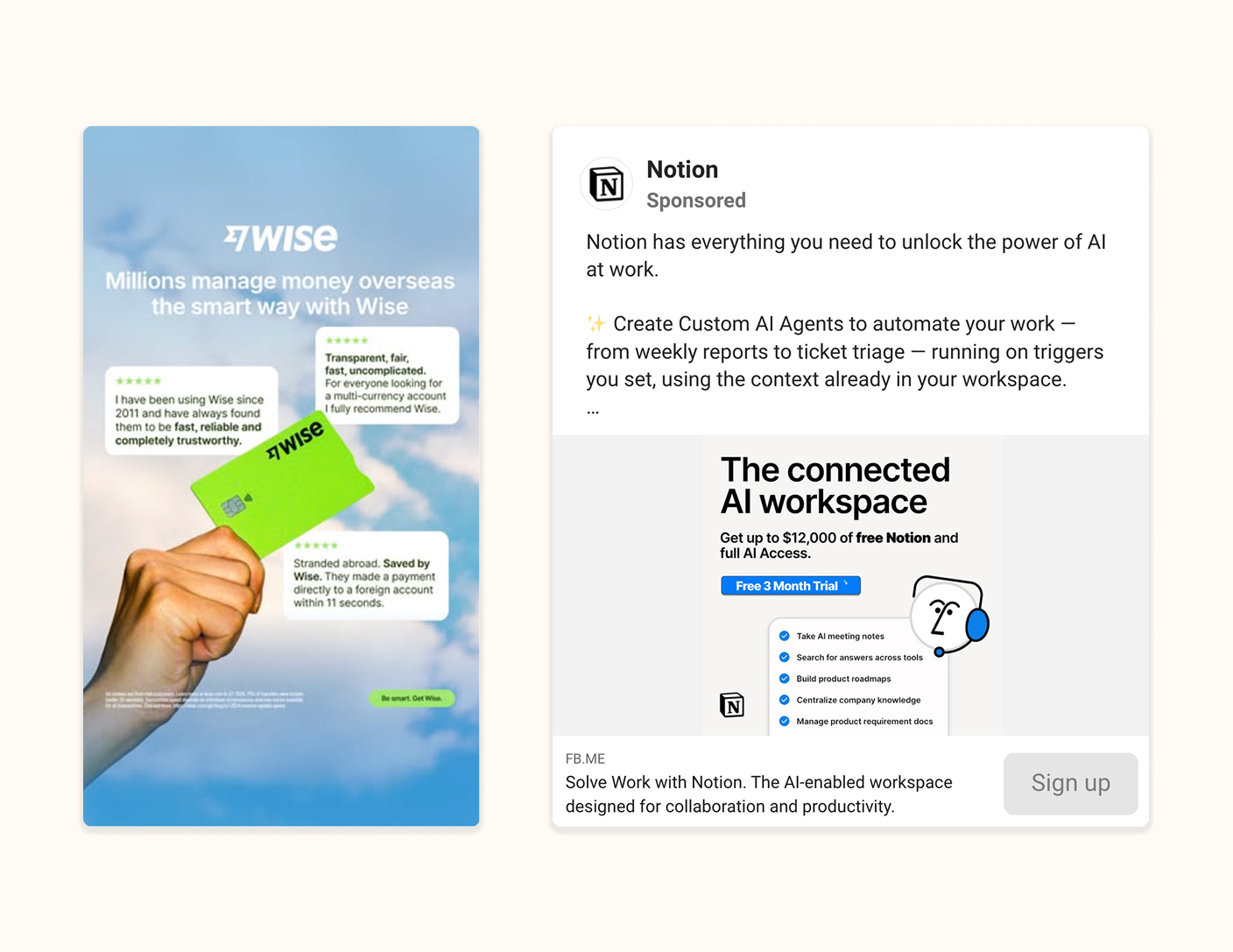
Creative approaches worth testing:
- Discounts and special offers.
- Before-and-after storytelling.
- UGC-style videos built around a USP or entertaining story.
- Testimonials and creator reviews.
- Tutorial videos that demonstrate the product and its main benefit.
Start with these guides:
Mark this red if: The account has no testing cadence and relies on a few similar ads. The last creatives were updated more than 14 days ago.
What to do next: Plan the next four weeks of distinct concepts and give every test a hypothesis and primary business metric.
9. Placements
Do the ads work across the placements receiving spend?
You do not need to force every creative into one fixed set of dimensions. You do need to check how the ads actually render.
In my earlier audits, seven out of ten accounts were missing suitable creative for important placements. In every one of those cases, performance improved after the placement problem was fixed.
The most common issue is missing the extra ad format for Stories and Reels placements. Below’s an example of how a 1:1 ratio ad renders in stories: not nicely.
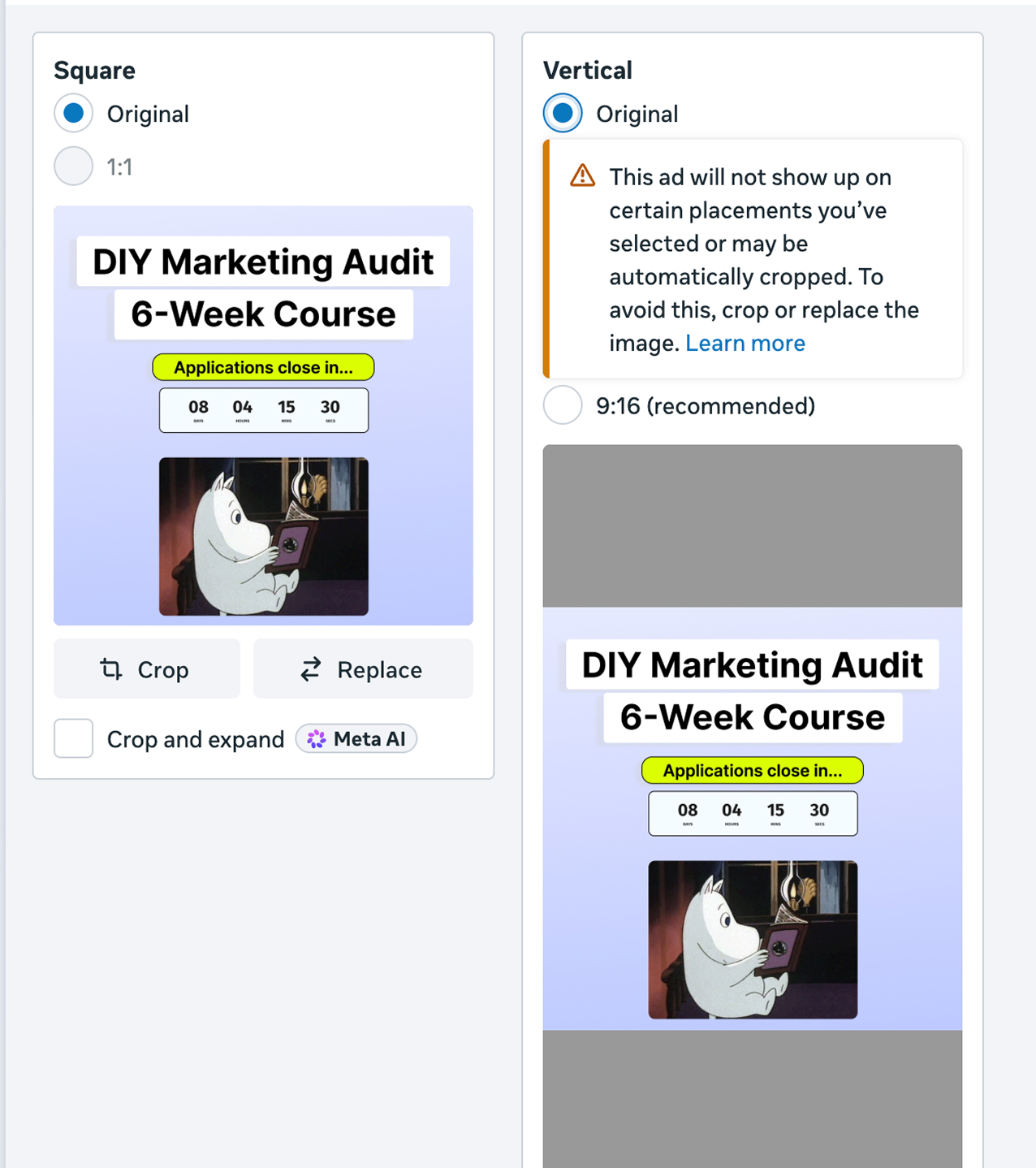
These are the most common mistakes I look for:
- There are no separate creatives for Feed and Stories placements for each ad.
- Feed, Stories and Reels versions do not feel intentionally designed.
- The main message is difficult to read on mobile.
- Video captions are missing, inaccurate or unreadable.
- The call to action does not match the destination.
Use the current Facebook and Meta ad sizes guide and Instagram ad sizes guide when preparing assets, then preview every important placement before launch.
Mark this red if: A high-spend placement shows cropped, unreadable, misleading or visibly broken creative.
What to do next: Fix the assets for the placements that matter before excluding placements solely to hide a creative problem.
10. Post-click journey
Does the post-click journey convert profitably?
Sometimes the ad account is not the main problem.
A strong ad can still send people to a slow page, unclear offer, broken form, confusing checkout or product page that does not match the promise.
The landing-page header does most of the work above the fold. It should immediately match the ad, show the product or offer, explain the value and make the next step obvious. If the header is vague, visitors start questioning whether they have landed in the right place.
For practical examples, see my six ideas to improve your website header.
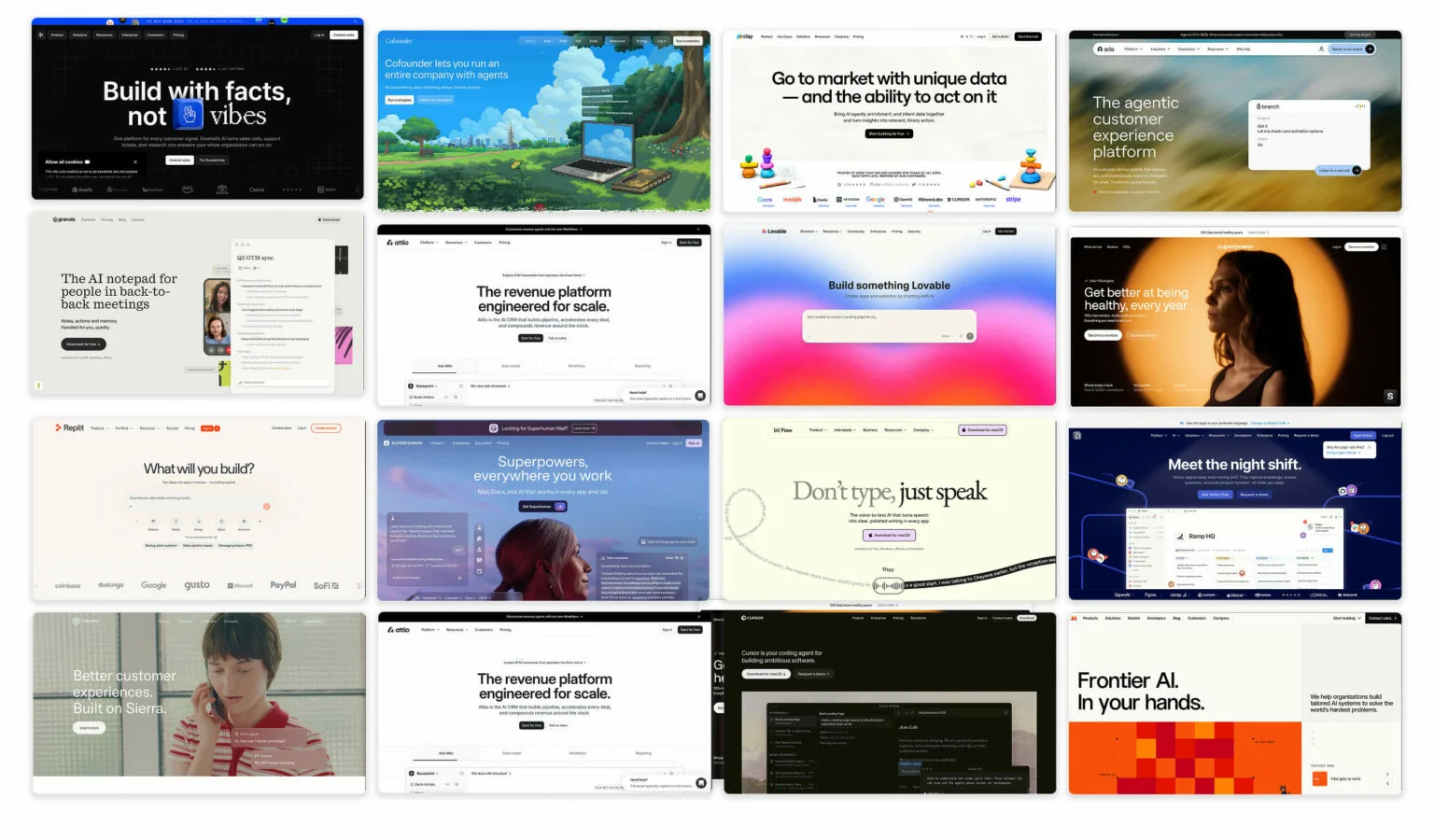
These are the most common mistakes I look for:
- The ad and landing page communicate different messages or offers.
- The landing page is slow or difficult to use on mobile.
- The promoted product or next action is not immediately clear.
A low landing-page conversion rate can make every upstream metric look expensive.
Open the destination URL from the ad-level setup rather than assuming every ad leads to the intended page. Then look at the experience as a new visitor would:
- Is the page simple and focused on the offer?
- Is the next step obvious?
- Is the promoted product visible?
- Does the wording and visual style match the ad?
- Can someone complete the action easily on mobile?
If the ad promises a 50% discount, the landing page should immediately explain that discount. If the ad promotes one product, it should not lead to a generic page for something else.

Sometimes the ad and landing page are both weak or visibly disconnected.
In this case, it can be easier to redesign the website experience and ads together than to keep patching two experiences that were never built to match.
Mark this red if: The landing page is slow on mobile, does not match the ad, or fails to make the product, offer and next step immediately clear.
What to do next: Open the exact destination URL from each ad, fix the header and remove the biggest mobile conversion barrier before increasing spend.
Prioritising the fixes
What should you fix first?
Turn every red or amber finding into an action with three fields:
| Finding | Action | Success metric |
|---|---|---|
| Example: Purchase event duplicates some orders | Fix browser/server deduplication and validate test purchases | Test orders fire once with correct value |
| Example: Six small ad sets compete for limited spend | Consolidate comparable ad sets and preserve necessary market splits | More stable delivery and enough signal to compare results |
| Example: No new creative concepts in six weeks | Launch three meaningfully different concepts | Each concept receives enough delivery for a useful decision |
Start with the issue that makes the rest of the data least trustworthy.
Use a simple three-point priority system:
- Fix now: The issue makes the data unreliable, blocks conversions or causes serious budget waste. Examples include broken tracking, the wrong optimisation event, the wrong market or a landing page that does not work.
- Fix next: The account can still run, but the issue limits performance or learning. Examples include fragmented delivery, unclear attribution, weak creative variety or tests that never receive enough spend.
- Improve later: The setup already works and the change is likely to be incremental. These are useful refinements, but they should not distract from more consequential problems.
When two fixes have the same priority, start with the one affecting more spend, more customers or more downstream decisions.
Record the date, reason and expected outcome. Give the campaign enough time and delivery to produce a useful signal before declaring victory.
Need expert help?
Some Meta ad accounts need more than a checklist to fix problems and start getting real results.
If you’d like to bring an experienced Meta Ads expert on board to manage your campaigns and run weekly creative testing, read how I collaborate with brands.
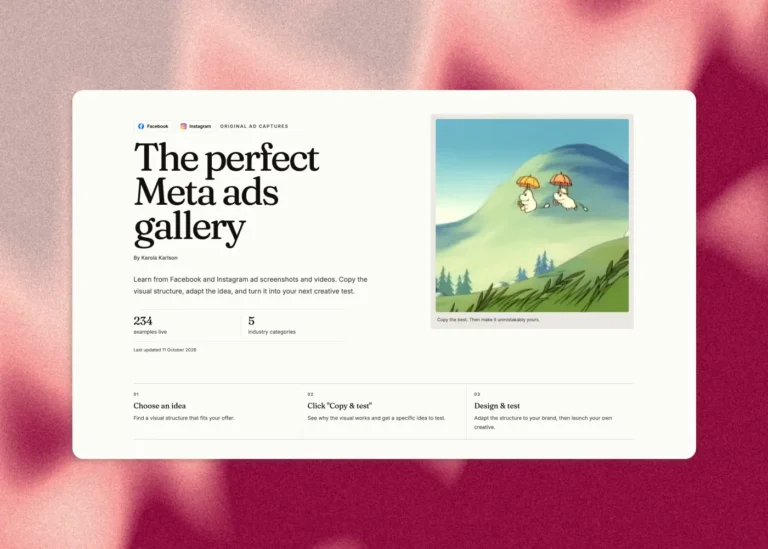

![Instagram Ad Targeting – 84-point Guide [2025 UPDATE]](https://karolakarlson.com/wp-content/uploads/2025/01/instagram-ad-targeting-768x512.jpg)
![Facebook Post & Ad Sizes in 2026 – Foolproof Guide [Updated]](https://karolakarlson.com/wp-content/uploads/2025/01/facebook-ad-size-768x512.jpg)
 Facebook
 Instagram